Step-by-Step Tutorial
Tutorial to find and navigate early France’s Maritime Records by administration division (quartier).
Example # 3 ‘ Search by Quartier (an administrative division) filter:
As you can see, all filters I mention in the previous page “Find French Maritime Enrollments & Records”, are on the left side of the image. I will break down each individual filter for this demonstration. In this filter example, “Choisir un quartier‘ ( choose a quartier), click the down arrow in green located on the right side of field choice. The drop-down list of many administrative cities are shown. For this tutorial, I’ve chosen the quartier of Bourgneuf-en-Retz. There is a green link with an arrow that is labeled “valider” that is not shown on this image as it is covered by the drop-down list. It needs to clicked to show the results.
Image #1:

Voilà, 154 results of various years, and assortment of men with different ranks (which I will explain), for Bourgneuf-en-Retz. There are 7 columns of identificated Here, * Cote, * Quartier, * Syndicat, * Grade, * Typologie, * Dates extremes, * Tables alphabétiques. In this demonstration, In the arrow in red, I chose ‘tables alphabétiques’ (alphabetical index) of 1850. You’ll see to the right, the service of these grade of mariniers was from 1850 & ended 1864. For the ‘grade’ of Matelots de Service and Officiers mariniers’ attached to the Quartier Bourgneuf-en-Retz. If one is looking for a specific name of a marinier, this is where you want to start your search. (Indexes are the greatest of all time savers). Explanation for blue arrow is under image #3
Image #2
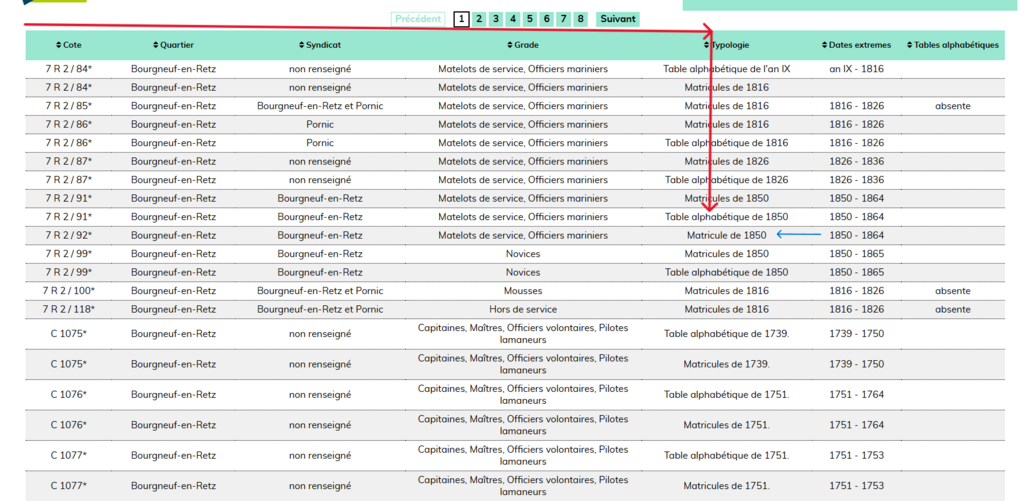
Image #3
Clicking the above link of ‘table alphabetique 1850’, will bring up the index of the ‘Matelots de service’ last names of ‘A’ to ‘Z’ mariniers. I’ve selected the last name of ‘DANIEL, Alexis Louis from the ‘C’, ‘D’ index for this demonstration.
Column labels:
- NOMS – last name
- PRENOMS – First name
- FOLIOS – Book page
- NUMÉROS – Document number
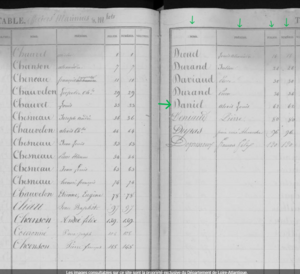
The page number & document number are the same -62. This usually means there is only one document to each page. Now, with that information we go back to image #2. The blue arrow guides you to the group of images labeled Matelots de Service’s matricule (service) record of 1850. There are two groups of matricule documents that start at 1850. Both groups are of the same images as the other. Click on that link.
Image #4

After you click on the group of images for the 1850 Matelots de service, you finally come to the matricule records! We will be looking for page #62 and document #62 for the maritime record of Alexis Louis DANIEL.
I am NOT an expert on interpreting the column names, but I’ll give you what I know. (Just a reminder that French men had to enlist into a military service at the age of 20 yrs, but looks like he enlisted earlier than 1828). Information in boxes:
- Red Box – (folios) Page #62 – (numéros) document #62
- Purple box- Grade (rank)
- made Matelot 3rd class 2 Sept 1846
- promoted to Matelot 2nd class 1 Jan 1852
- Orange Box – Recruitment
- no information
- Green Box
- top -biographical information
- bottom – physical description
- Yellow Box- Ship’s log, with dates
To absolutely prove this person’s biographical information provided is true, one must look and find the birth record documented by the town’s municipal officer of court. Then, of course, source, cite, or upload that information to your family tree.
This ends the ‘Find Maritime Records by Quartier’ tutorial.